How to convert Preeti to Unicode without garbled text
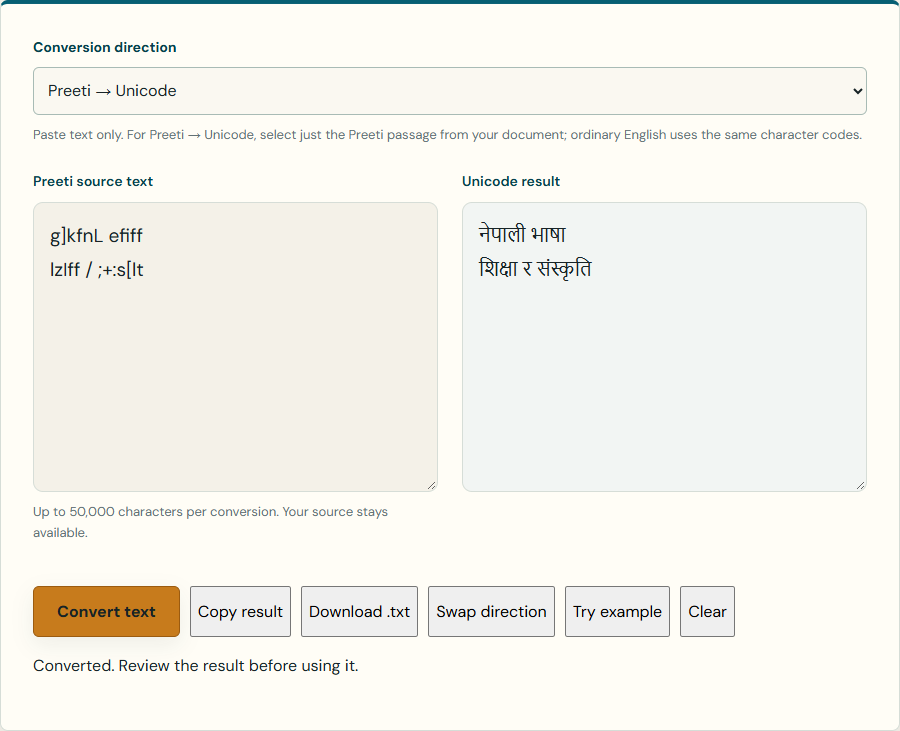
If an older Nepali document looks correct in its editor but copying it produces letters such as g]kfnL, you may be copying Preeti-encoded text. Converting the character encoding can make that text usable in applications that support Nepali Unicode.
Open the Preeti Unicode converter
Confirm the source before converting
Look at the font assigned to the Nepali passage in the original document. Kalika’s converter is for Preeti. A different legacy font may use different mappings, and changing its font name does not repair the encoding. Keep the original document so you can compare the result.
Convert one short passage first
- Open the converter and select Preeti → Unicode.
- Copy a short Nepali passage from the source document into Preeti source text. Leave ordinary English text out of the selection.
- Press Convert text. The original remains in the source box and the result appears separately.
- Compare the Unicode result with the document, particularly names, vowel marks, half letters and punctuation.
- Use Copy result or Download .txt after reviewing. Convert longer passages only when the short test looks right.
Use a known example to check the direction
The Try example button supplies g]kfnL efiff and lzIff / ;+:s[lt on separate lines. In Preeti → Unicode mode, they become नेपाली भाषा and शिक्षा र संस्कृति. These examples are also checked by Kalika’s conversion tests.
Why the output might still look wrong
- Wrong direction: choose Preeti → Unicode for encoded Latin-looking input. Unicode → Preeti intentionally produces legacy characters.
- Mixed English and Nepali: English letters overlap Preeti codes. Convert only the Preeti passage, then put the English text back in your document.
- Broken PDF copying: extracted text may have missing characters or a different reading order. Try copying from the editable source. An image-only PDF cannot provide text to this converter.
- Wrong font: a passage using another legacy font needs a converter for that encoding.
- Unusual mappings: some glyph variants or damaged passages need manual correction.
Save text without losing the original layout
The converter handles up to 50,000 characters per conversion. It converts text, not tables, font sizes or page layout. Paste the Unicode result into a copy of the original document and rebuild formatting where needed. The .txt download contains UTF-8 text and does not embed a font.
When you need Unicode to Preeti
Choose Unicode → Preeti, paste Nepali Unicode and convert. In the destination editor, apply the Preeti font to the converted Nepali section. Latin-looking output is expected before applying that font; keep English sections in their original font.
Romanized words need a different tool
A word such as namaste is Romanized Nepali, not Preeti encoding. Use Nepali Typing for that task. See how to type Nepali with an English keyboard for spelling and mixed-language tips.
Keep a reviewed copy
Conversion runs in your browser without uploading the text. The tool does not save your writing in browser storage, so copy or download it before leaving or reloading the page. Your choice to send or publish the result elsewhere is a separate action.